The short version: if you can draw the exact path your automation should follow before the data arrives, build a normal workflow. If one step needs language understanding, put AI inside that workflow. Use an AI agent when the path itself has to change based on what the system discovers. More intelligence is not automatically better automation.
There is a funny stage almost everyone hits after discovering n8n.
You build a few normal workflows. Then you discover the AI Agent node, see that it can use tools, reason through a task and decide what to do next, and suddenly every automation starts looking like it should have an agent in the middle of it.
I did the same thing mentally. Why build ten nodes when I can just tell an agent what I want?
The answer is that those ten boring nodes are often exactly what makes the automation reliable.
An agent is useful when you genuinely cannot know the next step in advance. If the next step is already known, giving an LLM permission to choose it usually adds cost, latency and another way for the workflow to surprise you.
This guide is the decision framework I wish I had at the start. We will compare three architectures: a normal n8n workflow, a normal workflow with one or two AI-powered steps, and a full tool-using AI agent. Then we will put them against real tasks and see where each one wins.
First: what is a normal n8n workflow?
A normal workflow is a path you define.
Something happens, n8n receives the data, and your nodes run in the order and branches you configured. A Gmail trigger receives a message. An IF node checks a condition. A database node looks up a customer. A Slack node sends a notification.
The important part is not that every workflow is literally a straight line. You can have branches, loops, retries, sub-workflows and complicated logic. The important part is that you decide the logic before the workflow runs.
Example: New email → classify the message → add the correct Gmail label → if a reply is needed, create a draft → stop.
The email changes. The classification changes. But the shape of the job does not.
That is exactly how the email triage system I built in n8n works. AI understands the email, but it does not get to invent the workflow.
So what makes an AI agent different?
An agent is not simply “a workflow that uses ChatGPT.”
A normal workflow can call an LLM ten times and still not be an agent. The defining difference is agency: the model can look at the situation, decide what it needs to do next, choose from tools you gave it, inspect the result and continue until it believes the task is complete.
Imagine a customer writes:
“I upgraded yesterday, but the app still says I’m on the free plan. I also got charged twice. Can you fix this?”
A fixed support workflow now has a problem. What should happen first?
- Look up the account?
- Check the payment provider?
- Search previous support tickets?
- Read the refund policy?
- Check whether the plan entitlement failed to sync?
The answer depends on what each previous step reveals. That is where an agent starts earning its complexity.
Agent version: read ticket → decide to inspect account → see that the paid plan exists → inspect payment history → discover a duplicate charge → search the refund policy → prepare the appropriate action → ask a human to approve the refund and response.
Another ticket might cause the same agent to take a completely different route.
n8n currently supports this style of tool-using AI workflow, including human review before selected tool calls are executed. That last part matters: “the agent can do it” and “the agent should be allowed to do it without approval” are two very different questions.
The option people skip: AI inside a normal workflow
This is the architecture I think beginners should use far more often.
You keep the workflow deterministic, but let an LLM handle the one part that ordinary rules are bad at.
- Read an email and classify its intent.
- Extract a company name, invoice number and due date from messy text.
- Summarize a long support ticket.
- Score whether a lead sounds genuinely interested.
- Draft a reply that a person will approve.
The model supplies judgment. n8n still supplies control.
That distinction is the reason the email triage workflow I mentioned earlier deliberately uses a classifier rather than giving an agent unrestricted access to Gmail actions. I want AI to answer one fuzzy question — “what kind of message is this?” — and then I want boring, predictable nodes to take over.
Workflow vs AI step vs AI agent
| Question | Normal workflow | Workflow + AI step | AI agent |
|---|---|---|---|
| Who chooses the path? | You | You | The model, within your tools and instructions |
| Best for | Clear, repeatable processes | Clear process with one fuzzy language task | Variable, multi-step investigation or action |
| Predictability | Highest | High | Lower |
| Typical AI usage | None | One or a few targeted calls | Multiple reasoning/tool calls |
| Debugging | Easiest | Usually manageable | Hardest |
| Cost and latency | Lowest | Moderate | Usually highest |
| Can adapt its next step? | Only through rules you wrote | Only through rules you wrote | Yes |
Notice that “agent” is not sitting at the top of the table as the upgraded version. These are different tools.
Example 1: email triage — an agent is probably overkill
Suppose the job is:
When a new email arrives, decide whether it is Finance, Needs Reply, Newsletter or Notification. Add the corresponding label. If it needs a reply, prepare a draft.
There is AI here because language is messy. “Can you send me the bill?” and “please forward the invoice” mean almost the same thing even though the words differ.
But there is almost no reason for an agent to choose its own sequence of actions. Every email follows the same basic path:
New email → AI classification → fixed branch → Gmail action → done
Putting an agent here means giving a probabilistic system freedom to choose something you already know should happen. It can work. It is just solving the wrong problem.
If this is the type of automation you want to build, the complete n8n AI email triage guide walks through it node by node.
Example 2: support investigation — now the agent earns its keep
Now give the system a broader goal:
Investigate incoming support tickets, collect the information needed to understand the issue, draft the best response, and escalate anything risky or uncertain to a human.
The agent might have tools for:
- reading the customer’s account;
- searching previous tickets;
- querying product documentation;
- checking billing history;
- creating an engineering ticket;
- drafting an email;
- requesting human approval.
Here, trying to pre-build every possible branch becomes its own form of madness. Billing problems, login problems, bugs, misunderstood features and account configuration can all require different evidence in different orders.
The useful thing the agent contributes is not fancy prose. It contributes dynamic orchestration: deciding which tool is relevant now, then deciding what the result means for the next step.
Example 3: invoice processing — do not confuse “messy input” with “agentic task”
This is another easy place to overbuild.
You receive invoices in different layouts. You need to extract the vendor, total, tax, invoice number and due date, validate the fields, then store the result in your accounting system.
The input is unpredictable. The process is not.
Use AI or document extraction for the messy part. Then use fixed validation and database/accounting nodes for the rest. An agent adds little unless the workflow also needs to investigate discrepancies, choose among multiple systems or negotiate exceptions.
What an agent costs you besides API money
The obvious cost is tokens. An agent may call the model multiple times, send tool results back into the model, inspect another tool and continue. A fixed workflow might need one model call where an agent needs several.
But API cost is usually not the biggest reason to avoid unnecessary agents. The bigger costs are operational.
1. You lose some predictability
A fixed node does exactly the operation you configured. An agent interprets instructions. Good prompts, structured tools and guardrails reduce the uncertainty, but they do not turn the model into an IF statement.
2. Debugging gets more interesting
When a normal workflow fails, you can usually point at the red node. With an agent you may instead ask: was the system prompt unclear, did the model choose the wrong tool, did the tool description mislead it, did bad data come back, or did the model reason badly from correct data?
3. Latency grows
A tool-using loop has more round trips than a straight automation. Nobody cares if a back-office research task takes twenty seconds instead of three. They care a lot more when an interactive customer experience suddenly feels sluggish.
4. Permissions become a design problem
A model that can read a database is different from a model that can change a database. A model that can draft a refund is different from one that can issue it. The more capable the tools, the more deliberately you need to decide which actions require approval.
Human approval is not a failure of automation
There is a temptation to judge an automation by how completely it removes the person.
I think that is backwards.
If an agent can do ninety percent of the investigation and hand a human a ready-to-approve action with the relevant evidence, that can be a much better system than one that automatically performs the final risky ten percent.
Good candidates for approval gates include:
- sending external emails in your name;
- issuing refunds or payments;
- deleting records;
- changing account permissions;
- making irreversible updates;
- taking action when the agent’s evidence is incomplete.
n8n’s current AI tooling supports human review around tool calls, so this does not have to be an awkward system bolted on afterward. Design the approval boundary when you design the tools.
A simple decision tree
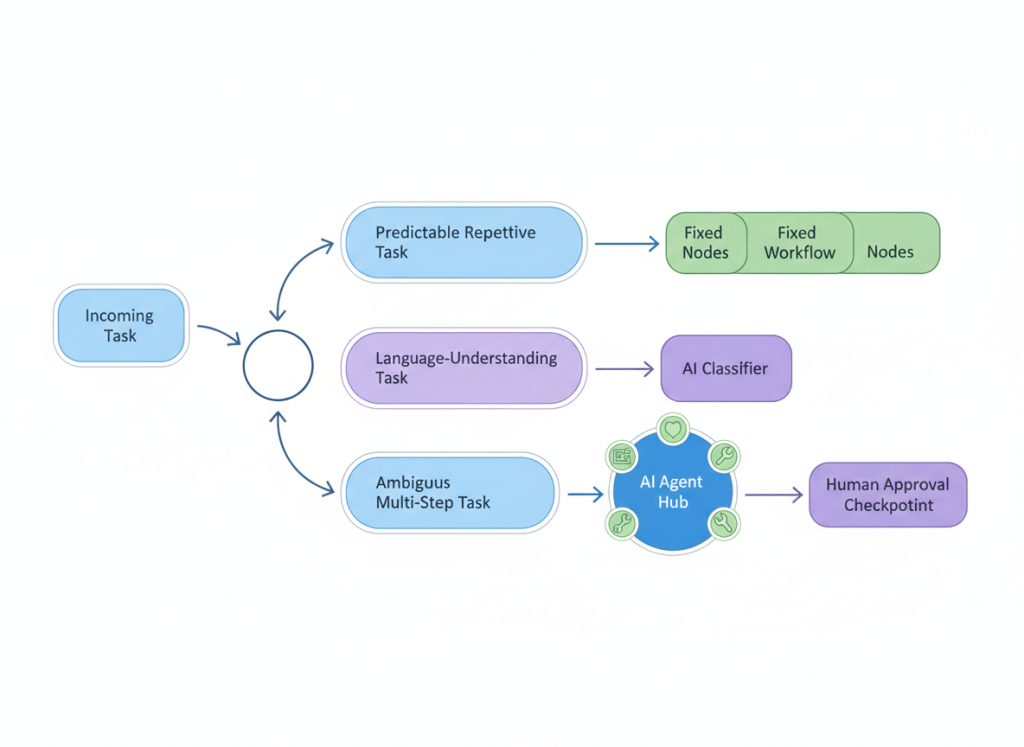
When I am deciding what to build, these are the questions I use:
Can I describe the exact sequence of steps before the workflow runs?
Yes: build a normal workflow.
No: keep going.
Is the uncertainty only inside one step?
Maybe you know exactly what to do, but you need AI to understand the email, extract fields, classify intent or write text.
Yes: use AI inside a normal workflow.
No: keep going.
Does the system need to choose among tools based on what it discovers?
If the answer is yes — and especially if the number or order of steps can change — you now have a strong reason to use an agent.
Can any of those tools do something expensive, external or irreversible?
If yes, do not just make the prompt stricter. Put an actual permission or human approval boundary around the action.
My rule: use the minimum necessary agency
This is the principle underneath the entire article.
Use the least autonomous system that can solve the problem well.
Rules before AI. Targeted AI before agents. Agents before autonomous high-impact actions.
That is not anti-agent. It is how you make agents useful.
If you reserve them for the jobs where dynamic decisions actually matter, you get the flexibility without turning your whole automation stack into something probabilistic.
Can you mix all three? You probably should.
Real production systems do not need to pick one architecture for everything.
A strong pattern looks like this:
- Normal workflow receives the event, validates required data and applies basic rules.
- AI classification/extraction handles the fuzzy language step.
- Agent is invoked only for the cases that require investigation.
- Human approval guards high-impact actions.
- Normal workflow records the result, updates systems and sends deterministic notifications.
This architecture also gives you a graceful escape hatch. If ninety percent of requests are simple, there is no reason to spend agent-level time and money on all one hundred percent.
A note if you are learning “agentic AI”
If you are coming from normal automation tools, this distinction also explains why agentic AI is a real engineering area rather than just “prompting ChatGPT.”
The prompt is one small part. The difficult work is designing:
- what tools the agent is allowed to use;
- what each tool is supposed to do;
- what context the model receives;
- how memory or previous state is handled;
- how you recover from a failed tool call;
- how you observe what happened;
- where a person must approve or take over;
- how you test whether the system is actually reliable.
n8n gives you a convenient canvas for a lot of that infrastructure. It does not remove the design decisions.
Frequently asked questions
Is an AI classifier an AI agent?
Not by itself. A classifier takes an input and returns a category. It is an AI-powered step, but it is not independently choosing and sequencing tools to pursue a goal.
Can a normal n8n workflow use ChatGPT or another LLM?
Absolutely. Using an LLM does not automatically make a workflow agentic. You can use a model for classification, extraction, summarization or drafting while keeping every action and branch under normal n8n logic.
Are AI agents more advanced than normal workflows?
They are more flexible, not universally better. A calculator is more predictable than an agent asked to do arithmetic, and a fixed automation is often better than an agent for the same reason. Use flexibility where it buys you something.
Do AI agents need memory?
No. Memory can be useful when the task depends on previous interactions or persistent state, but an agent can reason over the current task and use tools without long-term conversational memory.
Should I let an AI agent send emails automatically?
For low-risk, tightly constrained cases that may be acceptable. For customer, financial, legal, recruiting or other consequential communication, I would usually start with drafts or an approval step. Removing one click is rarely worth giving up the safety boundary while you are still learning how the system behaves.
Where I would start
If you are new to n8n, do not make your first serious build a fully autonomous agent.
Build one deterministic workflow. Then add one AI step where ordinary rules genuinely struggle. Once you have felt the difference between deterministic failure and model failure, build an agent with two or three tools and an approval boundary.
That progression teaches you much more than dropping an AI Agent node onto the canvas and hoping the model figures everything out.
If you want the practical first build, start with my AI email triage workflow. If you want to own the infrastructure too, the self-hosted n8n Docker guide takes you from an empty server to a working instance with PostgreSQL, HTTPS and backups.
Next build: I’m turning the support example from this article into a real n8n agent — account lookup, documentation search, ticket history, tool approvals and the failure cases that show up once it leaves the demo stage.


Leave a comment